How to Turn off off Road on Jeep: Easy Steps for Smooth Driving
 Reading Time: 8 minutes
 If you’ve ever found yourself wondering how to turn off off-road mode on your Jeep, you’re not alone. Maybe you’ve just finished an adventurous trail and want to switch back to regular driving settings, or perhaps your Jeep got stuck in off-road mode and you’re unsure how to regain control.
Whatever the reason, knowing how to quickly and safely disable off-road features can save you time and give you peace of mind on the road. In this guide, you’ll discover simple, step-by-step methods to turn off off-road mode on various Jeep models, so you can get back to smooth, everyday driving with confidence.
Keep reading to unlock the secrets your Jeep’s controls are waiting to reveal!
Off-road Features On Jeep
Jeep vehicles come with several off-road features designed to handle rough terrains. These features improve traction, stability, and control. Understanding each feature helps you drive safely on and off the road.
Turning off off-road mode means knowing how these systems work and how to disable them when not needed. Below are key off-road features found on many Jeep models.
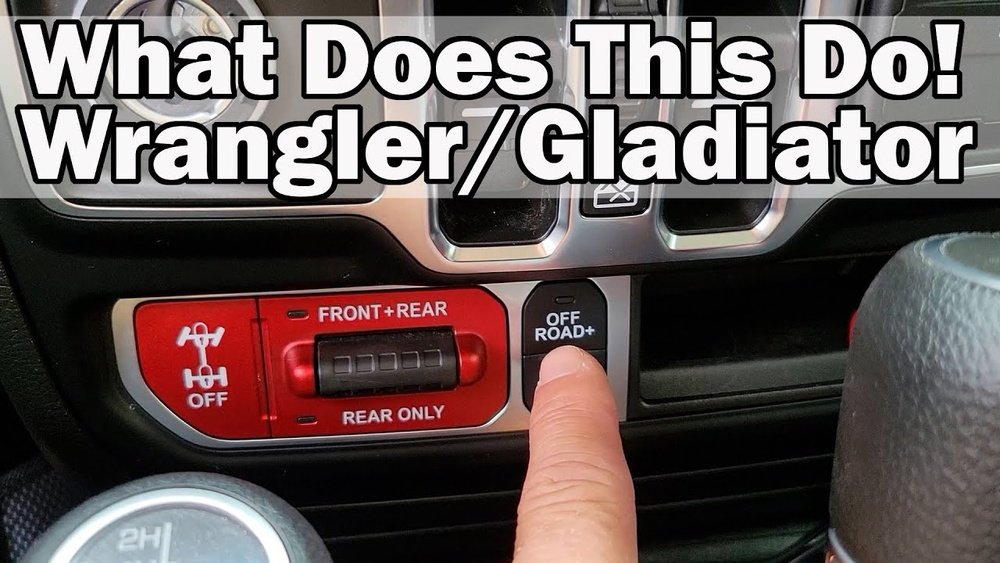
Off-road Plus Button
The Off-Road Plus button enhances traction in sand and mud. Press it to activate special traction control settings. To turn off, press the button again. This returns the vehicle to normal driving mode.
Selec-terrain Dial
The Selec-Terrain dial adjusts your Jeep’s settings for different surfaces. Options include snow, sand, mud, and rock. Turn the dial back to the default or “Auto” mode to exit off-road settings. This helps the vehicle perform better on paved roads.
Lockers And Sway Bar
Lockers lock the axles to improve wheel grip on tough trails. The sway bar increases stability by reducing body roll. Press the locker button to unlock axles and the sway bar button to reconnect it. This turns off the off-road enhancements for smoother street driving.
Traction Control
Traction control prevents wheel spin on slippery surfaces. Off-road driving sometimes requires turning it off for better wheel movement. To turn traction control back on, press the traction control button (ESC). This ensures safer handling on regular roads.

Credit: www.youtube.com
Signs Jeep Is In Off-road Mode
Knowing the signs that your Jeep is in off-road mode helps you drive safely. Off-road mode changes how the vehicle behaves and uses its systems. These signs appear clearly on the dashboard and in the way the Jeep drives. Recognizing them lets you decide when to turn off off-road mode for regular driving.
Dashboard Indicators
The dashboard shows clear symbols when off-road mode is active. Look for icons like a mountain, rocks, or a Jeep with traction lines. These lights tell you the vehicle is using special settings for rough terrain. The instrument cluster may also display messages like “Off-Road” or “4WD Low.” These indicators help confirm the mode without guessing.
Drive Feel And Performance
Off-road mode changes how your Jeep handles the road. The ride feels firmer and slower, with more traction control active. You may hear the engine working harder or notice a different shift pattern. Steering can feel heavier, and braking may respond differently. These changes are designed to improve grip and stability on tough surfaces but feel unusual on smooth pavement.
Steps To Disable Off-road Mode
Disabling off-road mode on a Jeep helps you switch back to normal driving settings. This process ensures better fuel efficiency and smoother rides on paved roads. The steps vary depending on your Jeep model and the features it offers. Follow these simple instructions to turn off off-road mode safely and quickly.
Each step targets specific controls that manage your Jeep’s off-road capabilities. This guide covers the Off-Road Plus button, Selec-Terrain dial, lockers, sway bar, and traction control. These components work together to optimize your vehicle for tough terrain. Turning them off returns your Jeep to regular driving mode.
Using The Off-road Plus Button
The Off-Road Plus button activates special traction for rough terrain. To disable it, locate the button on the center console. Press the button once more to turn off this mode. Watch for the indicator light on the dashboard to confirm it is off.
Adjusting The Selec-terrain Dial
The Selec-Terrain dial controls your Jeep’s drive mode. Turn the dial from off-road settings to “Auto” or “Normal.” This switches the vehicle’s traction and stability systems back to road mode. Check your instrument cluster for confirmation of the new setting.
Unlocking Lockers And Reconnecting Sway Bar
Lockers lock the wheels for better grip on rough surfaces. Press the locker button to unlock them after off-road use. The sway bar disconnect helps with wheel articulation. Press its button to reconnect the sway bar for street driving. These steps improve handling on smooth roads.
Re-enabling Traction Control
Traction control prevents wheel spin in slippery conditions. If you turned it off for off-road driving, press the traction control button again. This reactivates the system for safer road driving. A dashboard light will show when traction control is back on.
Tips For Smooth On-road Driving
Driving a Jeep on regular roads needs different care than off-road adventures. Smooth on-road driving makes your ride safer and more comfortable. Use these tips to switch off off-road settings and improve road performance.
Switching To Appropriate Drive Modes
Jeep models have drive modes for various conditions. Choose the mode designed for pavement or city streets. This change adjusts traction and power delivery. It helps the Jeep handle better and saves fuel. Avoid leaving off-road modes active on highways or smooth roads.
Monitoring Tire Pressure
Check tire pressure regularly for smooth driving. Proper inflation improves grip and ride quality. Underinflated tires cause uneven wear and reduce fuel efficiency. Overinflated tires make the ride harsh and less stable. Use a gauge to keep pressure within Jeep’s recommended levels.
Maintaining Vehicle Settings
Reset any altered off-road settings before street driving. Turn off lockers or sway bar disconnects used off-road. Enable traction control and stability systems for safety. Regularly check your Jeep’s manual for proper settings. Keeping the vehicle in correct mode reduces wear and improves control.
Common Issues And Fixes
Jeep’s off-road mode enhances driving in rough terrains. Sometimes, this mode may not turn off as expected. Understanding common issues helps fix these problems quickly. This section covers typical problems and easy solutions.
Off-road Mode Stuck On
Sometimes, the off-road mode stays active even after switching to normal drive. This can happen due to sensor glitches or electronic faults. First, try pressing the off-road button again to deactivate it. If that fails, turn off the engine and restart the Jeep. This often resets the system and clears the mode.
Check if the vehicle is fully in Park or Neutral. The system may block mode changes if the Jeep is moving. Also, inspect the off-road switch for physical damage or dirt that might cause a stuck button.
Troubleshooting Transfer Case
The transfer case controls four-wheel drive modes, including off-road settings. Problems here can prevent exiting off-road mode. Listen for unusual noises when shifting gears, which could signal mechanical issues.
Try shifting the transfer case lever slowly between 2WD and 4WD modes. If it feels stuck, avoid forcing it. Low fluid levels inside the transfer case can cause malfunction. Check the fluid and top it up if needed. Visit a mechanic if problems persist.
Resetting Vehicle Systems
Resetting the Jeep’s vehicle systems can clear errors that lock off-road mode. Disconnect the battery for about 10 minutes to reset the onboard computer. Reconnect the battery and start the vehicle to see if the mode turns off.
Some Jeep models have a reset option in the settings menu. Follow the owner’s manual steps to perform a system reset. This simple action often restores normal mode function without professional help.
Credit: www.rhinousainc.com
Using Off-road Mode Wisely
Using off-road mode wisely helps protect your Jeep and improves driving safety. Off-road features enhance performance on rough terrain but are not for regular roads. Knowing when and how to use these modes saves wear and tear. It also keeps your Jeep running smoothly for longer.
Understanding the benefits and limits of off-road mode ensures you get the most from your vehicle. Use these features only when needed to avoid damage and unnecessary fuel use. Let’s explore the best practices for using off-road mode.
When To Engage Off-road Features
Engage off-road mode on dirt, mud, sand, or rocky paths. Use it when traction is poor or the terrain is uneven. Avoid using it on paved or smooth roads to prevent extra strain. Activate these features before driving into challenging areas. This prepares your Jeep for better control and stability.
Benefits Of Off-road Mode
Off-road mode improves traction by adjusting power delivery to wheels. It helps your Jeep climb steep hills and cross rough surfaces safely. The system adjusts brakes and suspension for better handling. It also reduces wheel spin and prevents getting stuck. These benefits make off-road driving easier and safer.
Avoiding Unnecessary Wear
Using off-road mode on normal roads can cause damage to tires and drivetrain. It increases fuel consumption and may wear out components faster. Turn off off-road mode as soon as you return to paved roads. This reduces stress on your Jeep’s parts and saves fuel. Proper use extends the life of your vehicle.

Credit: www.reddit.com
Frequently Asked Questions
How To Turn Off Off-road In Jeep?
To turn off off-road mode in a Jeep, press the Off-Road+ button again. Switch the Selec-Terrain dial to “Auto” or “Sport. ” Unlock axles by pressing locker buttons and re-enable traction control by pressing the ESC button.
How To Turn On Off-road In Jeep Wrangler?
To turn on off-road mode in a Jeep Wrangler, shift to neutral and engage 4WD low using the transfer case lever. To turn it off, shift back to 4WD high or 2WD and return the transfer case lever to its normal position.
Why Does My Jeep Say Off-road?
Your Jeep shows “off-road” to indicate activation of Selec-Terrain mode, optimizing traction for rough conditions like mud, sand, or rocks.
How Do I Get My Jeep Grand Cherokee Out Of Off-road Mode?
Start your Jeep Grand Cherokee and keep it in Park. Locate the Selec-Terrain dial on the center console. Turn the dial from the off-road mode to “Auto” or “Sport. ” Confirm the change on the digital instrument cluster. This exits off-road mode and optimizes driving for regular roads.
Conclusion
Turning off the off-road mode on your Jeep is simple and quick. Just press the Off-Road+ button again or switch the Selec-Terrain dial to a regular driving mode. Make sure lockers and sway bars are disengaged if you used them.
Re-enable traction control for safe street driving. These steps help your Jeep perform better on normal roads. Always check your dashboard to confirm the mode change. Drive safely and enjoy a smooth ride after switching off off-road features.