How to Turn off Dome Light: Simple Steps to Save Battery Fast
 Reading Time: 10 minutes
 Are your car’s dome lights staying on longer than you want? Maybe they turn on every time you open the door, or worse—they won’t turn off at all.
If you’ve ever found yourself wondering how to turn off those bright interior lights quickly and easily, you’re in the right place. Knowing exactly how to control your dome lights can save your car’s battery and keep your ride comfortable.
In this guide, you’ll learn simple, step-by-step ways to switch off your dome lights—whether your car uses a slide switch, push button, dimmer knob, or even an infotainment system. Keep reading to take full control of your car’s interior lighting and avoid any unwanted surprises.
Dome Light Basics
The dome light is a small interior light in most vehicles. It helps illuminate the car’s cabin when doors open or when you need extra light inside. Knowing how to turn off the dome light saves battery power and avoids unwanted light while driving at night. This section explains the basics of dome lights and how to find their controls.
Different cars have different ways to control the dome light. Most controls are easy to reach and use. Understanding the common switch types will help you quickly turn the light off or adjust it as needed.
Location Of Controls
Dome light controls are usually found on the ceiling of the car. They are often near the rearview mirror or on the overhead console. Sometimes, they are on the dashboard or inside the door panel. Checking these common spots helps you find the switch fast.
Some vehicles place the control on the light lens itself. In newer cars, the settings might be inside the infotainment system screen. This means you can change dome light behavior through the car’s digital menu.
Common Switch Types
The most common dome light switch is a slide switch. It usually has three positions: On, Off, and Auto. Auto mode turns the light on when a door opens and off when it closes. Slide the switch to Off to keep the dome light from turning on.
Push-button switches are also popular. Pressing the button turns the light on or off manually. Some buttons also disable the door-triggered light if pressed in a certain way.
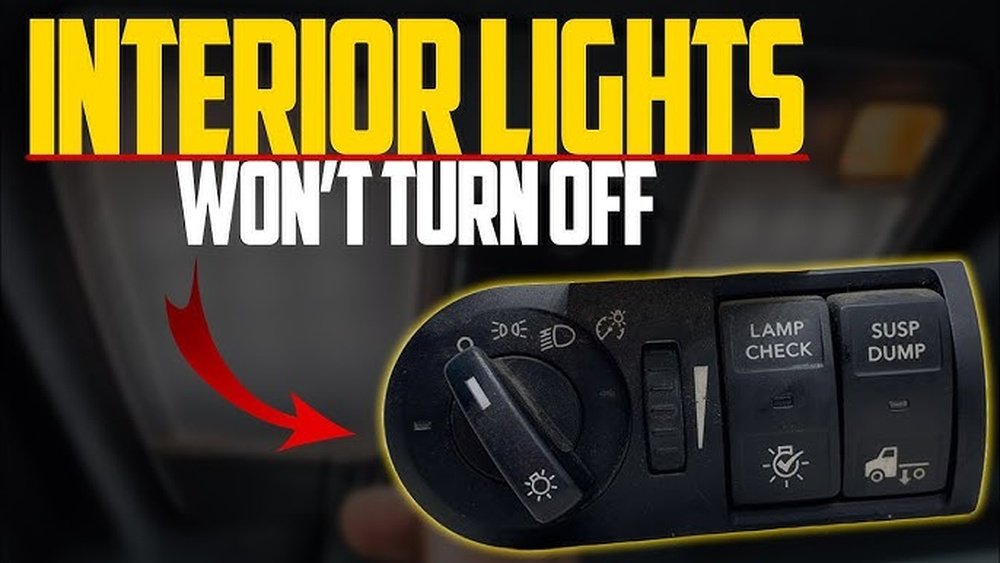
A few cars use a dimmer knob near the headlight control. Turning it fully down can turn off the dome light. Modern vehicles may have settings in their infotainment system to adjust dome light functions.

Credit: www.ford-trucks.com
Using Slide Switches
Using slide switches is a simple way to control your car’s dome light. These switches are usually located on the overhead console near the light. They let you choose between automatic, off, or on modes. Slide switches are easy to use and require no special tools. Understanding each position helps you manage your car’s interior lighting efficiently.
Auto Position Function
The auto position lets the dome light turn on and off with the doors. It uses a sensor to detect when a door opens. This setting is convenient for entering or exiting the car at night. The light switches off automatically after the door closes. It saves battery life by not staying on too long.
Off Position Benefits
Sliding the switch to the off position keeps the dome light off. The light will not turn on, even if you open the doors. This helps save your car battery if you park for a long time. It also stops the light from bothering passengers while driving at night. Use this setting when you want full darkness inside the car.
On Position Usage
The on position keeps the dome light on all the time. This can be useful when you need extra light inside the car. It helps if you search for something or read a map. Keep in mind, the light will drain the battery if left on too long. Always switch it back to auto or off after use.
Operating Push Buttons
Operating push buttons offers a simple way to control your car’s dome light. These buttons are usually located on or near the dome light fixture itself. They allow you to turn the light on or off manually, or change how it reacts to door openings. Understanding how to use these push buttons can help you save battery power and avoid the light staying on unintentionally.
Manual On/off
Press the push button once to switch the dome light on. The light will stay on even if all doors are closed. Press the button again to turn the light off. This manual control lets you use the dome light without relying on door sensors. It is useful when you need light inside the car without opening doors.
Disabling Door Activation
Some cars allow you to disable the dome light’s door activation using the push button. Press and hold the button for a few seconds. The dome light will no longer turn on when doors open. This prevents the light from draining your battery if a door sensor is faulty or if you want the light off while doors are open. To reactivate door control, repeat the same button press and hold.
Adjusting Headlight Knob And Dimmer
The headlight knob and dimmer control more than just your vehicle’s exterior lights. They often manage the brightness of your interior lights, including the dome light. By adjusting these controls, you can turn off or dim the dome light without fiddling with the overhead switch. This is helpful when the dome light stays on longer than you want or when you need to reduce glare inside the car at night.
The dimmer is usually a small wheel or knob near the headlight switch. Turning it down lowers the brightness of all interior lights. In some cars, rolling the dimmer all the way down turns the dome light off completely. This method offers a quick way to control the dome light without opening the overhead console or pressing buttons on the light itself.
Turning Interior Lights Down
Locate the dimmer control near your headlight knob. It often looks like a small wheel or slider. Slowly rotate it counterclockwise to reduce the brightness of your interior lights. Keep turning until the lights dim or turn off.
This technique works well if your dome light stays on too bright or if you want a darker cabin while driving. It also helps save battery power when your car is parked but the lights remain on.
Specific Car Models
Some vehicles have unique ways to adjust dome lights using the headlight knob and dimmer. For example, Jeep models often include a thumbwheel next to the headlight switch. Rolling this wheel fully down will turn off the interior dome light.
Other cars may require holding the dimmer at the lowest setting for a few seconds to disable dome lights. Consult your vehicle’s manual for exact instructions. Learning your car’s system saves time and prevents battery drain.
Infotainment System Controls
The infotainment system in many modern vehicles offers more than just music and navigation. It also provides control over interior settings, including dome lights. Using the infotainment system controls allows you to customize your dome light behavior with ease. This method is especially helpful if your car does not have a physical switch or if you want more precise control.
Accessing Lighting Settings
Start by turning on your car’s infotainment screen. Locate the main menu and look for the “Controls” or “Settings” option. Within this section, find the “Vehicle” or “Lighting” tab. This area contains all the settings related to interior and exterior lights. Scroll until you find the dome light options. Here, you can adjust how the dome light reacts to door openings or manual commands.
Customizing Dome Light Behavior
Once inside the lighting settings, you can change the dome light’s behavior. Choose to have the light turn off completely, stay on only when doors are open, or remain on at all times. Some systems allow you to set a delay timer for the dome light to turn off after closing the door. Adjust these settings until you find the perfect balance for your needs. Save your changes before exiting the menu to ensure they take effect.
Troubleshooting Dome Lights Staying On
Dome lights staying on can drain your car battery quickly. Troubleshooting this issue helps avoid unexpected power loss. Start by checking simple causes before moving to complex fixes. Understanding common reasons behind dome lights staying on saves time and effort.
Checking Door, Hood, And Trunk Switches
Door, hood, and trunk switches control dome light activation. Open and close each door carefully. Listen for clicks or feel the switch movement. Dirt or debris can block switches, causing lights to stay on. Clean switches gently with a cloth or contact cleaner. If a switch feels loose or stuck, it may need replacement.
Manual Override Settings
Manual override settings let you control dome lights directly. Locate the switch on the overhead console or near the lights. Slide or press the switch to the “Off” position. Some vehicles have a push button to turn lights off manually. Check your vehicle’s manual for specific instructions. Override settings can bypass door switches, turning off the light instantly.
Identifying Faulty Door Jamb Switches
Faulty door jamb switches often cause dome lights to stay on. These switches signal when doors are open or closed. Test each switch with a multimeter for electrical continuity. Replace any switch that fails the test. Signs of a bad switch include no clicking sound or inconsistent light behavior. Replacing faulty switches restores normal dome light function.
Additional Tips To Save Battery
Saving your car battery involves more than just turning off the dome light. Small habits and checks can extend battery life. These additional tips help you avoid battery drain and keep your vehicle ready to go.
Regular Maintenance Checks
Check your battery terminals for corrosion. Clean them with a brush to ensure good contact. Inspect cables for wear and tightness. A loose connection can cause power loss. Test the battery voltage regularly. Replace old batteries before they fail. Keep your vehicle’s electrical system in good shape. Regular checks prevent unexpected battery problems.
Using Timer Features
Some cars have timers for interior lights. Use these timers to limit how long dome lights stay on. Set the timer to turn off lights quickly after you close doors. This avoids unnecessary battery use. If your car lacks this feature, consider adding an aftermarket timer switch. Timers help manage power and save battery life effectively.
Avoiding Common Mistakes
Do not leave doors or trunk open for long periods. Interior lights stay on and drain the battery. Avoid manually turning dome lights on when parked. Check all light switches before exiting. Ensure no lights remain on accidentally. Avoid using high beam or accessory lights with the engine off. These small mistakes add up and weaken your battery over time.

Credit: www.youtube.com

Credit: www.reddit.com
Frequently Asked Questions
How Do I Turn Off Dome Lights In My Car?
Locate the dome light switch near the overhead console. Slide it to “Off” to disable lights, or press the lens/button to override door activation. Some cars use a dimmer wheel or infotainment settings to control dome lights. Check all doors fully close if lights stay on.
Why Won’t My Dome Lights Turn Off?
Dome lights won’t turn off if the door switch is stuck or a door is ajar. Check the overhead switch position. Faulty door sensors or manual override settings can also cause this issue. Ensure all doors, hood, and trunk are fully closed to fix the problem.
How To Disable Dome Light When Door Is Opened?
Locate the dome light switch near the overhead console. Slide it to “Off” to disable lights when doors open. Some cars use a push button or dimmer wheel. Check infotainment settings for modern vehicles. Ensure all doors fully close to prevent lights from staying on.
Why Is The Dome Light Always On In My Car?
The dome light stays on if the switch is set to “On” or “Auto. ” Check all doors, trunk, and hood are closed. A faulty door switch can also cause it. Adjust settings via overhead console, push button, or infotainment system to turn it off.
Conclusion
Turning off your dome light is simple with the right steps. Locate the switch or button near the light to control it. Slide it to the “Off” position or press the button to disable the light. For newer cars, check the infotainment system’s lighting settings.
Always ensure doors and trunk are fully closed to avoid lights staying on. If problems persist, a faulty switch might need attention. Following these easy tips helps save battery and keeps your car dark when needed.