How to Connect iPhone to Jeep Wrangler: Quick & Easy Guide
 Reading Time: 7 minutes
 Connecting your iPhone to a Jeep Wrangler can completely change how you drive. You’ll enjoy hands-free calling, easy music streaming, navigation, and more. But for many beginners, the process feels confusing. Different Jeep Wrangler years and trims support different features—Bluetooth, USB, Apple CarPlay, and sometimes even wireless connections. This guide explains each method step by step, so you can connect your iPhone quickly and safely, no matter which Wrangler you own.
Understanding Jeep Wrangler Connectivity Options
Jeep Wranglers have evolved over the years. Depending on your model year, you might have:
- Bluetooth
- USB port
- Apple CarPlay
- Auxiliary input
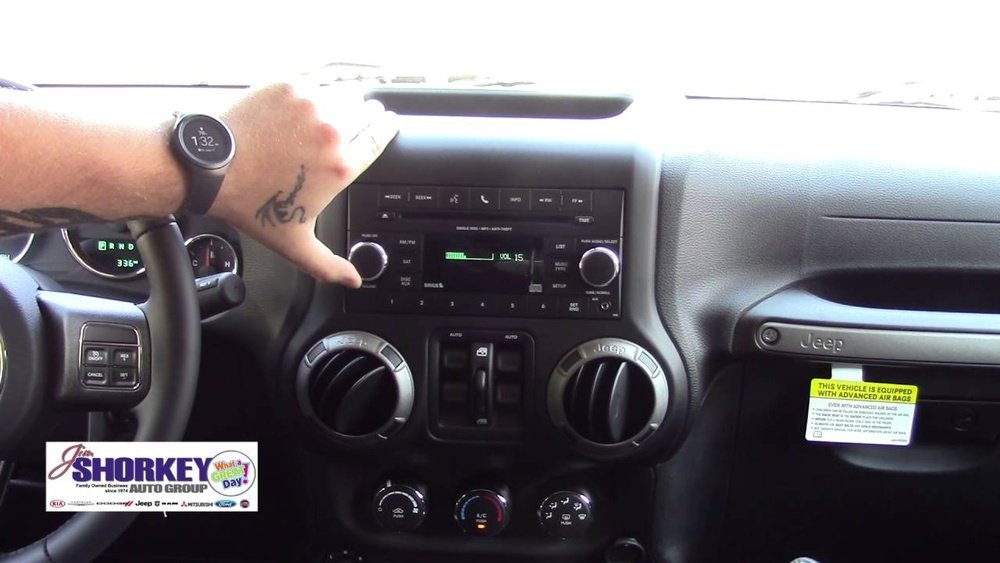
- Uconnect system (Jeep’s infotainment brand)
Most Wranglers from 2015 onward offer Bluetooth and USB connections. Apple CarPlay became common in 2018 and newer models. Knowing your Wrangler’s system is the first step.
Comparing Connectivity Features By Model Year
Here’s a quick comparison for recent Jeep Wrangler models:
| Model Year | Bluetooth | USB | Apple CarPlay | Uconnect |
|---|---|---|---|---|
| 2010-2014 | Optional | Yes | No | Basic |
| 2015-2017 | Yes | Yes | No | Advanced |
| 2018-present | Yes | Yes | Yes | Uconnect 4 or 5 |
Tip: Check your Jeep owner’s manual if you’re unsure about your system.
Connecting Iphone To Jeep Wrangler Via Bluetooth
Bluetooth is the most common way to connect your iPhone for hands-free calls and music streaming. Here’s how to set it up:
- Start your Jeep and keep it in Park.
- Enable Bluetooth on your iPhone. Go to Settings > Bluetooth and turn it on.
- On your Jeep’s touch screen, select “Phone” or “Media.”
- Choose “Add Device” or “Pair New Device.”
- Your Jeep’s system will show a code. On your iPhone, select your Jeep from the devices list.
- Confirm the code matches on both screens, then tap “Pair” on your iPhone.
After pairing, you can:
- Make and receive calls
- Stream music from apps like Apple Music or Spotify
- See caller ID and song info on your Jeep’s screen
Non-obvious insight: If your iPhone doesn’t connect automatically next time, try deleting the Jeep from the phone’s Bluetooth list, then pair again. Also, make sure your phone is not connected to other Bluetooth devices nearby.
Using Usb Connection For Music And Charging
Connecting your iPhone via USB is simple and reliable. It also charges your phone while you drive. Most Wrangler models have a USB port on the dashboard or center console.
- Use your iPhone’s charging cable (Lightning to USB).
- Plug the USB end into your Wrangler’s USB port.
- Plug the other end into your iPhone.
- Your Jeep’s screen will usually switch to Media or iPod mode.
- Select your iPhone as the audio source if needed.
Benefits:
- Reliable connection with less interference
- Charges your phone while playing music
- Some apps (like Podcasts) work even if Bluetooth is not available
Example: If your Wrangler supports only basic USB, you’ll see your music app’s name (like “iPod” or “Music”) on the Jeep screen, but you may not see album art or song details.
Setting Up Apple Carplay In Jeep Wrangler
Apple CarPlay lets you use your iPhone’s best features through your Jeep’s touch screen. You can use Maps, Messages, Music, and even Siri.
Most Jeep Wranglers from 2018 and later support Apple CarPlay (some 2017 models do too). Here’s how to connect:
- Plug your iPhone into the USB port with your charging cable.
- The Jeep’s screen should show an Apple CarPlay prompt. Tap it.
- On your iPhone, allow the CarPlay connection when prompted.
- The CarPlay interface will appear on your Jeep’s screen.
Tip: You can use voice commands by holding the voice button on your steering wheel or saying “Hey Siri.”
Wireless Apple Carplay
Some newer Wrangler trims (2021 and up) support wireless CarPlay:
- Enable Bluetooth and Wi-Fi on your iPhone.
- On the Jeep screen, go to “Settings” > “Phone/Bluetooth” > “Add Device.”
- Select your Jeep from your iPhone’s Bluetooth list.
- Follow the prompts to finish connecting.
Non-obvious insight: Wireless CarPlay uses more battery power. If you have battery issues, switch back to a USB cable.

Credit: www.youtube.com
Troubleshooting Common Connection Problems
Sometimes, things don’t work as expected. Here are common issues and solutions:
Iphone Won’t Pair With Jeep
- Restart both the iPhone and the Jeep’s Uconnect system.
- Make sure Bluetooth is enabled on both devices.
- Delete previous pairings on both the Jeep and iPhone, then try again.
Carplay Not Working
- Use an Apple-certified cable. Cheap cables often fail.
- Check if your Jeep supports CarPlay (models before 2018 may not).
- Update your iPhone to the latest iOS version.
- Try a different USB port (some Wranglers have more than one).
Music Won’t Play
- Make sure the audio source is set to Bluetooth, USB, or CarPlay.
- On iPhone, check if volume is up and not muted.
- Some apps require phone screen to stay on—try not to lock your iPhone right away.
Uconnect System Freezes
- Hold the Uconnect power button for 10 seconds to reset.
- If problems keep happening, visit your Jeep dealer for a software update.
Benefits Of Connecting Your Iphone
When your iPhone and Jeep Wrangler are connected, you get:
- Hands-free calling for safety and convenience
- Access to your favorite music apps
- Navigation with real-time traffic using Apple Maps or Google Maps
- Easy use of Siri for voice commands
- Read and reply to messages safely
Safety And Legal Benefits
- Many US states require hands-free phone use while driving
- Using built-in voice and CarPlay features can help you avoid fines

Credit: www.amazon.com
What To Do If Your Jeep Wrangler Doesn’t Support Carplay
Not all Wranglers have CarPlay. If yours doesn’t, you still have options:
- Use Bluetooth for calls and music
- Use USB for music and charging
- Install a CarPlay-compatible head unit (aftermarket upgrade)
Popular Aftermarket Carplay Head Units
Here’s a quick comparison of three popular options:
| Brand | Screen Size | Wireless CarPlay | Estimated Price (USD) |
|---|---|---|---|
| Pioneer | 7″ | Yes | $400-600 |
| Kenwood | 6.8″ | Yes | $350-550 |
| Alpine | 9″ | Yes | $600-900 |
Tip: Most aftermarket units fit Jeep Wranglers with some minor dashboard adjustments. Installation by a professional is recommended.
Maximizing Your Experience: Tips And Tricks
- Favorite contacts: Save your top contacts on your Jeep’s system for quick calling.
- Update your Uconnect: New software can fix bugs and add features.
- Voice commands: Practice using Siri to play music or set navigation. It gets easier with use.
- Shortcuts: Set up Siri Shortcuts on your iPhone for easier access to frequent actions.
Example: Say “Hey Siri, directions to work” as you start your Jeep. Maps will open and start navigation automatically.
Data Privacy And Security Considerations
When you pair your iPhone to your Jeep, some data is shared:
- Call logs
- Contacts
- Recent messages (with CarPlay)
To stay safe:
- Always unpair your phone before selling or renting your Jeep.
- Use your iPhone’s privacy settings to limit what is shared.
- Do not connect to public or unknown Bluetooth devices.
Non-obvious insight: If you rent or use a shared Jeep, always check the Bluetooth list for unknown devices and remove them. This keeps your data private.
Practical Examples For Everyday Use
Example 1: Road Trip
- Plug in your iPhone for CarPlay.
- Use Apple Maps for turn-by-turn directions.
- Listen to your favorite playlist on Spotify.
- Answer calls hands-free while driving.
Example 2: Daily Commute
- Use Bluetooth or USB for music.
- Use Siri to send a quick text.
- Check traffic updates using Maps.
Tip: If your Jeep has multiple drivers, each can pair their own iPhone for easy switching.

Credit: www.contemporarychryslerdodgejeepram.com
Comparing Connection Methods
Here’s a quick comparison to help you choose the best way to connect your iPhone:
| Connection Method | Best For | Music Quality | Allows Hands-Free Calls? | Navigation |
|---|---|---|---|---|
| Bluetooth | Hands-free calls, streaming | Good | Yes | Limited (audio only) |
| USB | Music, charging | Best | Yes (some models) | No |
| CarPlay | All features, navigation | Best | Yes | Full maps on screen |
Frequently Asked Questions
How Do I Know If My Jeep Wrangler Supports Apple Carplay?
Check your Jeep’s owner manual or look for a CarPlay logo on your infotainment screen. Most 2018 and newer Wranglers support CarPlay. You can also ask your dealer.
Why Isn’t My Iphone Connecting To My Jeep Wrangler?
Check Bluetooth and USB connections. Restart both the iPhone and Jeep system. Delete old pairings and try again. Use an Apple-certified cable for best results.
Can I Use Wireless Carplay In My Wrangler?
Wireless CarPlay is available in some 2021 and newer Wrangler models. Make sure both Bluetooth and Wi-Fi are enabled on your iPhone. If your Jeep doesn’t support it, use a USB cable.
Is It Safe To Connect My Iphone To A Rental Jeep Wrangler?
Yes, but make sure to remove your iPhone from the Jeep’s Bluetooth list before you return the vehicle. This keeps your contacts and call logs private.
What Should I Do If My Jeep’s Uconnect System Freezes?
Hold the Uconnect power button for about 10 seconds to reset. If the problem continues, visit your Jeep dealer for a software update or check their support site: Mopar Uconnect Support.
Connecting your iPhone to your Jeep Wrangler makes driving safer and more enjoyable. With a few simple steps, you can enjoy hands-free calls, music, and navigation. Remember to check your Wrangler’s year and features, use the right cables, and keep your software up to date.
If you ever have trouble, most issues are quick to fix with the right tips. Whether you’re new to Jeep or just want to get more from your iPhone, these steps will help you connect and drive with confidence.