How to Change Jeep Km to Miles: Easy Steps for Accurate Conversion
 Reading Time: 10 minutes
 If you’ve just purchased a Jeep or are traveling to a country that uses miles instead of kilometers, you might be wondering how to switch your Jeep’s speedometer from kilometers to miles. This change can make a huge difference in how you read your speed and distance, helping you stay safe and avoid confusing speed limits.
Luckily, changing your Jeep’s display units is simpler than you might think. You’ll find clear, step-by-step instructions that anyone can follow—no technical skills required. Keep reading, and you’ll soon be cruising with your speedometer showing miles per hour, making your driving experience smoother and more comfortable.
Locate Steering Wheel Controls
Changing your Jeep’s speed display from kilometers to miles starts with the steering wheel controls. These controls help you navigate the vehicle’s digital menu. You use them to find the right settings without reaching for the dashboard.
The buttons usually include arrows and an “OK” or checkmark button. These allow scrolling through menus and confirming choices. The controls are often on the left or right side of the steering wheel, easy to reach with your thumb.
Look closely at your steering wheel. You will see buttons with arrows pointing up, down, left, and right. There is also usually a button marked “OK” or with a checkmark symbol. These are the menu buttons.
These buttons let you enter the main menu on your Jeep’s digital display. Press the menu button once to open the settings screen.
Use the arrow buttons to scroll through the menu options. Look for words like “Settings,” “Setup,” or “System.” Press the “OK” button to select the highlighted option.
Keep scrolling until you find the “Units” or “Display” settings. This is where you can change the speed measurement.
Confirm Your Selection
After selecting “Units,” scroll down to find the speed unit option. It will usually say “Kilometers” or “Miles.” Highlight “Miles” and press the “OK” button to save your choice.
The speedometer will update to show miles per hour immediately. Your Jeep is now set to display miles instead of kilometers.
Access the Settings menu using the steering wheel buttons on your Jeep. Navigate to the Units or Display section. Select miles instead of kilometers to change the speed measurement easily.
To change your Jeep’s speed display from kilometers to miles, start by accessing the settings menu. This menu controls many vehicle functions, including unit measurements.
The settings menu is usually accessed using buttons on the steering wheel. These buttons help you navigate the digital display on your dashboard.
Look for arrows or a menu button on the steering wheel. Press the menu button to open the main settings screen.
Once inside the settings menu, you can scroll through options using the arrow buttons. Keep an eye on the display as you navigate.
Finding the right menu might take a few tries. Look for sections labeled “Settings,” “Setup,” or “System.” These often contain the unit options.
After you open the correct menu, you can switch the speed unit from kilometers to miles. This will update your dashboard to show miles per hour.
Find Units Or Measurement Options
Finding the units or measurement options in your Jeep is the key step to change kilometers to miles. This setting controls how distance and speed display on your dashboard. Jeep models often have a similar path to access these options, but exact steps can differ slightly.
Start by focusing on the vehicle’s main menu through the controls on your steering wheel. Look for buttons that help you scroll and select options, often arrows and an “OK” or checkmark button. These buttons allow you to navigate through different menus until you reach the units setting.
Press the menu or settings button on your steering wheel. This action brings up the main screen on your dashboard. From here, you can explore different settings related to your vehicle.
Locating The Units Or Measurement Section
Use the arrow buttons to scroll through the menu options. Watch for labels like “Settings,” “General,” or “System.” Within these, find “Units” or “Measurement.” This option controls the display format for distance and speed.
Selecting Miles Instead Of Kilometers
Once inside the units section, scroll until you find the speed or distance unit. Change it from kilometers (km) to miles (mph). Confirm the selection by pressing the “OK” or checkmark button. Your dashboard should update immediately to show miles.
Switch From Kilometers To Miles
Switching your Jeep’s display from kilometers to miles makes driving easier in the United States. The change helps you understand speed limits and distances better. This guide shows simple steps to switch units on your Jeep.
Most Jeep models use the steering wheel buttons to access settings. You do not need special tools or apps. Just follow the on-screen menus to change units.
Start by finding the arrow keys and the “OK” button on your steering wheel. These buttons control the display on your dashboard. They let you scroll through menus and select options.
Press the menu button to open the main settings screen. Use the arrow keys to move through the options. Look for words like “Settings,” “Setup,” or “System.”
Find And Select The Units Option
Scroll down to find the “Units” or “Measurement” section. This is where you can change the distance and speed units. Choose the option that shows kilometers or miles.
Change The Units From Kilometers To Miles
Select the miles (mph) option to switch the display. Confirm your choice by pressing the “OK” or checkmark button. The speedometer will update immediately.
After confirming, press the back or exit button to leave the menu. Check your dashboard to see the new units. Your Jeep is now ready to show miles instead of kilometers.
Save And Confirm Changes
After selecting miles as your preferred unit, the next step is to save and confirm these changes. This action ensures your Jeep’s dashboard shows speed in miles instead of kilometers.
Without saving, the system may revert to the previous setting. Confirming locks in your choice and updates the display immediately.
Save Your Unit Preference
Locate the “OK” or checkmark button on your steering wheel controls. Press it to save the new unit setting. This step is crucial for the change to take effect.
Double Check The Dashboard
Look at your speedometer after saving. It should now show numbers in miles per hour (mph). This confirms the switch was successful.
Restart Your Vehicle If Needed
Sometimes, the dashboard needs a quick restart to refresh. Turn off the engine, wait a few seconds, then turn it back on. Check the units again.
Troubleshoot Common Issues
If the speedometer still shows kilometers, repeat the steps carefully. Ensure you are in the correct menu and press the save button firmly.
Tips For Different Jeep Models
Different Jeep models may have varied steps to change the display from kilometers to miles. Knowing the exact process saves time and effort. This section offers clear tips tailored for popular Jeep models. Follow these easy instructions to adjust your Jeep’s speedometer correctly.
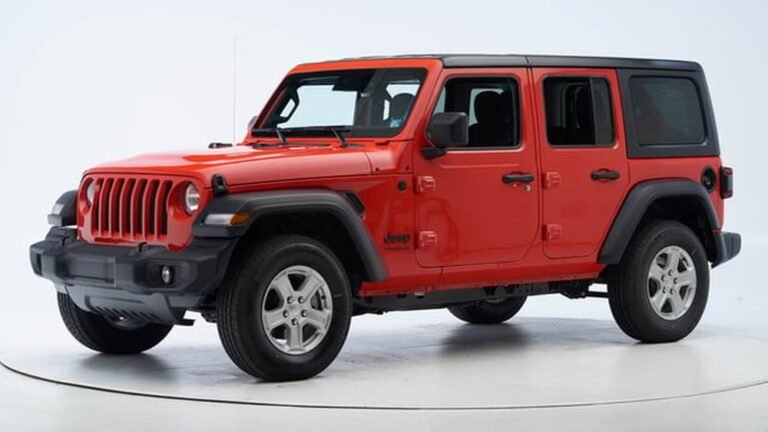
Changing Units On Jeep Wrangler
Use the steering wheel buttons to open the main menu. Navigate to the “Settings” or “Setup” option. Look for “Units” or “Display” settings. Select “Miles” instead of “Kilometers.” Press “OK” or the checkmark button to confirm. The display updates immediately.
Adjusting The Display On Jeep Grand Cherokee
Press the “Menu” button on the steering wheel. Scroll to “Settings,” then choose “Instrument Cluster.” Find “Units” or “Speedometer” settings. Switch from “Km” to “Miles.” Confirm your choice with the “OK” button. The dashboard now shows miles per hour.
Switching Units On Jeep Compass
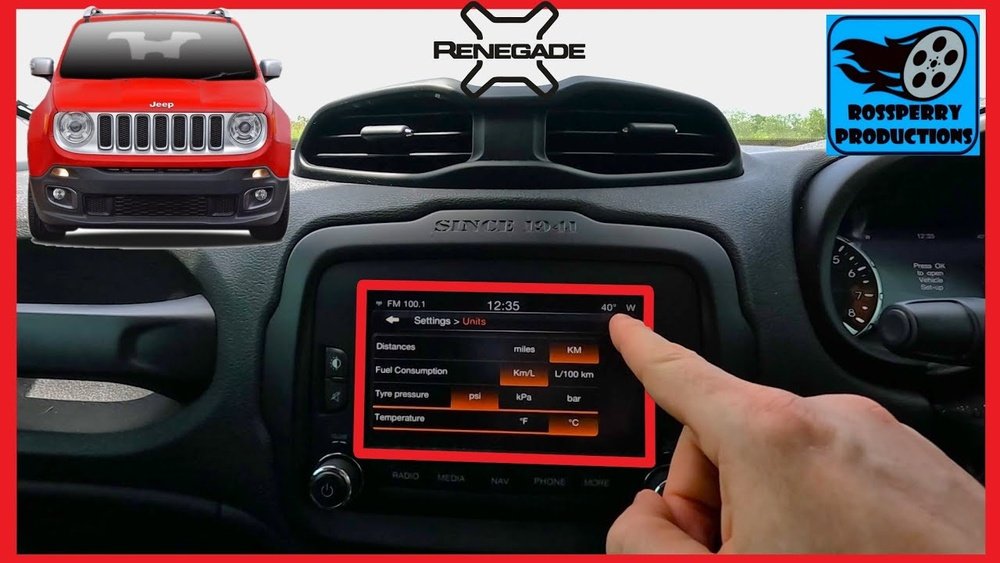
Tap the gear icon on the touchscreen or use steering wheel controls. Enter “Settings,” then select “Display” or “Units.” Change the speed unit to “Miles.” Save the new setting. The display changes without restarting the vehicle.
Tips For Older Jeep Models
Older Jeeps may not have digital settings for units. Check the owner’s manual for instructions. Some models require changing the cluster gauge physically. Visit a Jeep dealer or mechanic if unsure. They can help switch the units professionally.
Use Vehicle Owner’s Manual
The vehicle owner’s manual is the best guide to change the Jeep’s display from kilometers to miles. It contains clear instructions tailored to your Jeep model. The manual explains the exact steps to access and adjust the settings safely.
Most Jeep models allow you to switch units through the dashboard menu. The owner’s manual shows which buttons to press and how to navigate through menus. This method prevents guesswork and saves time.
First, open the owner’s manual to the section about the dashboard or instrument panel. It will show how to find the settings menu using the steering wheel buttons. These buttons often include arrows and a confirmation button.
Find The Units Or Display Option
Look for instructions on selecting the units or display settings. The manual guides you to scroll through options until you find kilometers or miles. This step varies slightly by Jeep model, so the manual is vital.
Change Kilometers To Miles
Follow the manual’s steps to switch the unit from kilometers to miles. Usually, this involves highlighting the miles option and pressing the confirmation button. The speedometer should update instantly.
Save And Exit Settings
The manual explains how to save your changes and exit the menu. It may require pressing a button or simply waiting for the display to update. Always follow the manual to avoid errors.

Credit: www.reddit.com
Check Online Video Tutorials
Online video tutorials show clear, step-by-step instructions for changing your Jeep’s km to miles. Videos help you see exactly where to press and what to select on your dashboard. This makes the process easier, especially if you find written guides confusing.
Many videos come from Jeep owners and experts who share tips and tricks. Watching these tutorials saves time and reduces mistakes. You can pause, rewind, and follow along at your own pace.
Where To Find Jeep Km To Miles Video Tutorials
YouTube is the top place for Jeep tutorials. Search for terms like “change Jeep km to miles” or “Jeep speedometer unit change.” You will find many videos showing different Jeep models and years.
Check the video date to ensure it matches your Jeep model. Older videos may have outdated methods. Newer videos usually show the latest menu options and steps.
What To Expect In These Tutorials
Most tutorials start by showing the steering wheel buttons you need to use. They guide you to the Settings or Setup menu on your Jeep’s dashboard screen. Then, they show how to find the Units option.
Next, they demonstrate selecting miles instead of kilometers. Finally, they confirm the change so the display updates correctly. Watching these steps makes the process clear and simple.
Benefits Of Using Video Tutorials
Videos reduce guesswork and frustration. You see the exact buttons and screens in real time. This visual aid helps you learn faster and avoid errors.
Many videos include voice instructions and captions. This makes it easy for non-native English speakers to follow along. You can also replay difficult parts as needed.
Overall, video tutorials offer a practical way to change your Jeep’s speed unit without stress.
Quick Digital Conversions
Quick digital conversions make switching your Jeep’s speed display simple. Many devices and apps let you change from kilometers to miles instantly. These tools help you track distance with ease while driving or planning trips.
Using digital platforms saves time. They offer clear, fast ways to convert units without manual math. This section covers two common digital methods you can use right now.
Google Maps Distance Settings
Google Maps can show distances in miles or kilometers. To change this, open Google Maps on your device. Tap your profile icon or settings menu. Look for “Distance units” in the settings list. Choose “Miles” to see all distances in miles instead of kilometers. This switch helps when you plan routes or check trip lengths for your Jeep. The change applies to driving directions and map measurements.
Apple Device Measurement System
Apple devices use a system-wide setting for units. Open the Settings app on your iPhone or iPad. Scroll to “General” and tap it. Find “Language & Region” and select it. Scroll down to find “Measurement System.” Choose “Imperial” to use miles and feet. This change updates all apps that show distance, including Maps and fitness trackers. It helps keep your Jeep’s distance readings consistent with your device’s units.

Credit: www.youtube.com

Credit: www.reddit.com
Frequently Asked Questions
How To Change From Km To Mph In Jeep?
Use the steering wheel buttons to access Settings. Navigate to Units or Display, then select Miles (mph). Confirm to save changes.
How Do I Change My Dashboard From Km/h To Mph?
Use the steering wheel buttons to open Settings. Navigate to Units, select Miles or mph, then confirm the change.
How Do I Switch From Km To Miles?
Use steering wheel buttons to access Settings or Setup menu. Find Units or Measurement section. Select Miles or mph. Confirm the change to switch from km to miles.
How To Change Km To Miles On Jeep Wrangler 2015?
Use the steering wheel buttons to open the Settings menu on your 2015 Jeep Wrangler. Navigate to Units, select Miles, and confirm. The speedometer will switch from kilometers to miles immediately. Check your owner’s manual if you can’t find the option.
Conclusion
Changing your Jeep’s display from kilometers to miles is simple. Use the steering wheel buttons to open the settings menu. Find the units option and select miles. Confirm your choice to update the speedometer. This quick adjustment helps you read distances in familiar units.
Practice these steps a few times to feel confident. Enjoy driving with the correct measurement on your dashboard. Your Jeep will now show miles clearly and accurately.