
How To Reset Jeep Compass Screen: Quick Easy Fixes
 Reading Time: 7 minutes
 Introduction
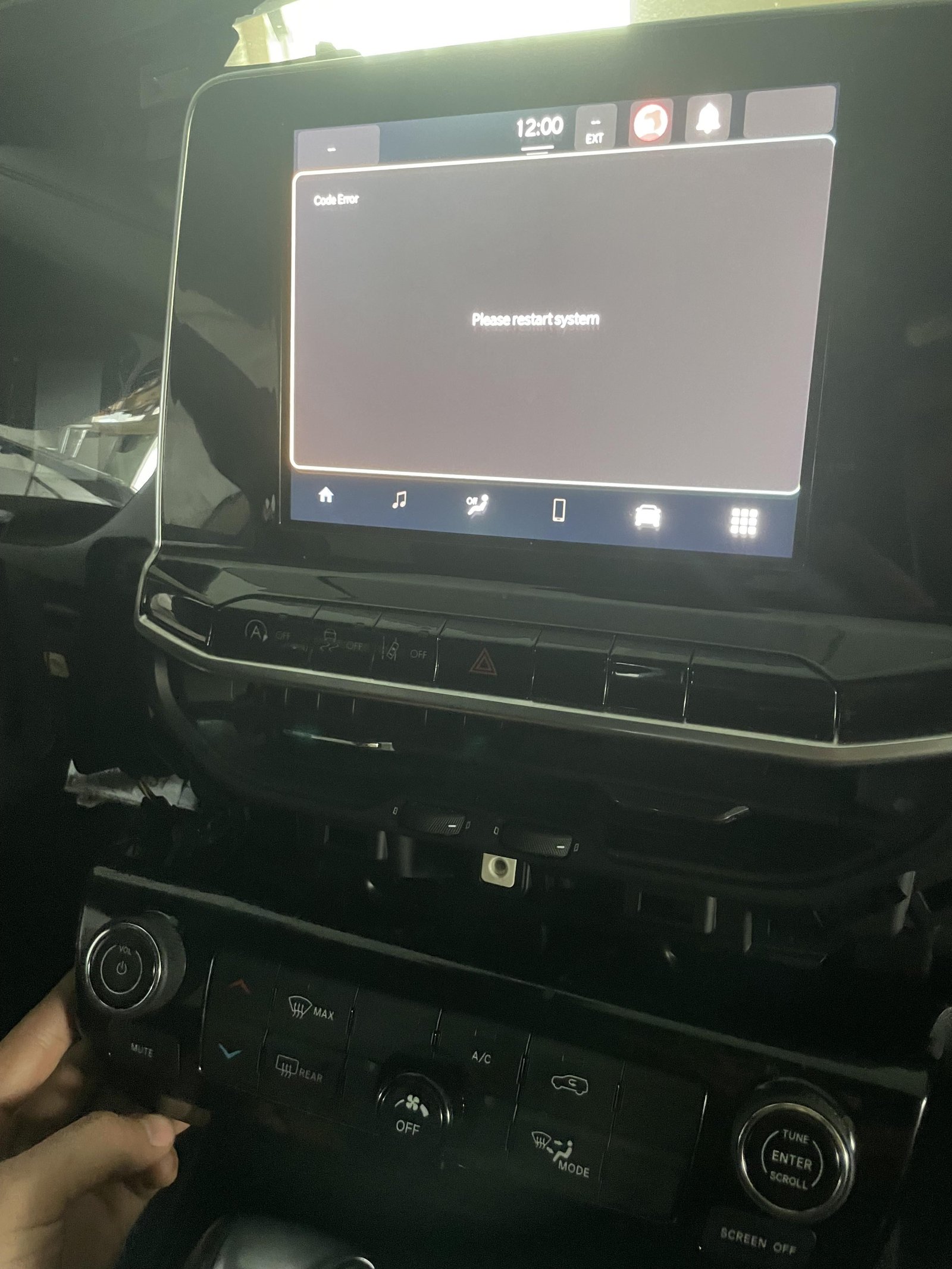
If the screen in your U.S.-market Jeep Compass is frozen, start with a soft reset: park the vehicle, turn it on, then press and hold the infotainment system’s power/volume control for about 10 seconds. If your Compass has separate power/volume and tune controls, press and hold both for about 10 seconds instead. Release the controls when the screen goes dark or the Jeep logo appears.
A soft reset restarts the screen system. It is not the same as a factory reset, which can erase saved settings and personal data. The right button sequence can vary by model year and Uconnect system, so check your Compass owner’s manual if these steps do not match your controls.
Before You Reset the Screen
Park before you use the controls. Do not try to troubleshoot a frozen screen while driving. If you need to move the vehicle, focus on driving and wait until it is safely parked.
A soft reset is a useful first step when the touchscreen is slow, frozen, blank, or not responding. It does not usually erase saved radio stations or paired phones, but results can vary by system. A factory reset is different and may remove personal settings.
Find your model year in the owner’s manual before trying a button sequence that does not match your dashboard. Compass models can have different Uconnect versions and control layouts.
How to Soft Reset a Jeep Compass Screen
Use the control setup that matches your Compass. Keep holding the buttons until the screen restarts; a quick press may only change the volume or station.
If your Compass has one power/volume control
- Park the vehicle and leave it in Park.
- Turn the ignition on, or start the vehicle.
- Press and hold the infotainment power/volume control for about 10 seconds.
- Release it when the screen turns off or the Jeep logo appears.
- Wait for the system to reload, then check the touchscreen, audio, and connected phone.
If your Compass has separate power/volume and tune controls
- Park the vehicle and leave it in Park.
- Turn the ignition on, or start the vehicle.
- Press and hold the power/volume control and the tune control at the same time for about 10 seconds.
- Release both when the display restarts.
- Wait for the system to finish loading before testing it.
The screen may take a short time to return. If it does not restart, do not keep trying random button combinations. Check the owner’s manual for the exact instructions for your model year and Uconnect system.
Soft Reset vs. Factory Reset
A soft reset restarts the infotainment system. A factory reset restores some settings to their original state and may remove saved data. Try the soft reset first unless you have a specific reason to clear the system.
| Reset type | What it does | When to use it |
|---|---|---|
| Soft reset | Restarts the screen system without intentionally clearing saved settings | The screen is frozen, slow, or briefly unresponsive |
| Factory reset | Restores selected system settings and may delete personal data | You want to clear saved data or a manual or service adviser recommends it |
Factory-reset menu names and options can vary. Look in the screen’s Settings menu or follow the steps in your owner’s manual. Before you confirm, read the warning on the screen and note any saved information you may need to set up again, such as paired phones or preferences.
If the Screen Still Does Not Work
If a soft reset fails, check the simplest causes first. A screen that stays black, repeatedly restarts, or works only sometimes may need more than a reset.
- Check whether the vehicle starts normally. If the vehicle also has trouble starting, the issue may involve the vehicle’s electrical system rather than the screen alone.
- Restart the vehicle once. Turn it off, wait briefly, then start it again. Do this only when parked in a safe place.
- Check for a phone-related problem. If the screen works until you connect a phone, unplug the phone and test the system. Then check the cable, phone settings, and connection method.
- Look for a screen message or software prompt. Follow the on-screen instructions and the owner’s manual. Do not install an update while driving or interrupt one once it has started.
- Contact a Jeep dealer or qualified repair shop if the problem returns. Ask them to check the infotainment system and related vehicle electrical components.
Avoid pulling fuses or disconnecting the battery just to restart the display unless the owner’s manual or a qualified technician tells you to. Those steps can affect other vehicle systems and may create new problems.

Common Reset Problems and Safety Tips
A reset will not fix every cause of a blank or unresponsive screen. The display may be affected by a software fault, a power issue, a failed component, or a phone connection problem. A reset can help identify a temporary glitch, but it cannot confirm which part caused it.
Keep these points in mind:
- Do not reset while driving. Set up navigation or audio before you move.
- Do not assume every Compass uses the same buttons. Check the layout and model-year manual.
- Do not confuse a reset with a software update. A reset restarts the system; an update changes its software.
- Do not use a factory reset as the first step. It can clear saved settings or personal data.
- Do not repeatedly force a reboot. If the screen keeps freezing, arrange a diagnosis.
If the screen is blank but the rest of the vehicle works, note when the issue occurs and whether it follows phone use, startup, or a specific system function. That detail can help a technician narrow down the cause.
Frequently Asked Questions
Will resetting my Jeep Compass screen erase my settings?
A soft reset is intended to restart the system, not erase saved settings. A factory reset may remove personal data or preferences. Check the on-screen warning and owner’s manual before confirming a factory reset.
How long should I hold the reset buttons?
For the button combinations described above, hold the control or controls for about 10 seconds. The exact method may differ by model year and Uconnect system. Stop if the controls do not match your vehicle and check its manual.
What if the screen is black and will not restart?
Make sure the vehicle is on and try the correct soft-reset method once. If the display stays black or repeatedly shuts off, contact a Jeep dealer or qualified repair shop. Do not pull fuses or disconnect the battery without vehicle-specific guidance.
Can I reset the screen while the vehicle is moving?
Wait until the vehicle is parked. A frozen display can distract you, and troubleshooting should not take your attention from driving.
Where can I find the exact steps for my model year?
Use the owner’s manual for your Compass model year. The official Mopar owner’s manual portal lets U.S. owners look up vehicle manuals: Mopar Owner’s Manuals.
Key Takeaways
- Park before troubleshooting the screen.
- Try a soft reset first; hold the matching infotainment control or controls for about 10 seconds.
- Button layouts and Uconnect systems vary, so use the owner’s manual when the steps do not match your Compass.
- A factory reset may erase personal settings. Use it only when needed.
- If the display keeps failing, seek a diagnosis rather than repeatedly rebooting it.
Conclusion
For a frozen Jeep Compass screen, begin with a parked, soft reset using the controls fitted to your model. If the display does not restart, or the problem comes back, check the model-year manual and arrange service. Avoid battery or fuse steps unless your manual or a qualified technician recommends them.