
Program Jeep Grand Cherokee Garage Door Opener: Easy Setup Guide
 Reading Time: 7 minutes
 Programming your Jeep Grand Cherokee garage door opener can make daily life easier. You press a button in your car, and your garage door opens without needing a remote. But for beginners, setting it up might seem confusing. This guide explains every step clearly, so you can program your Jeep’s HomeLink system quickly and safely. No technical experience is needed. You’ll also learn tips, common mistakes, and answers to popular questions.
Understanding The Jeep Grand Cherokee Garage Door Opener
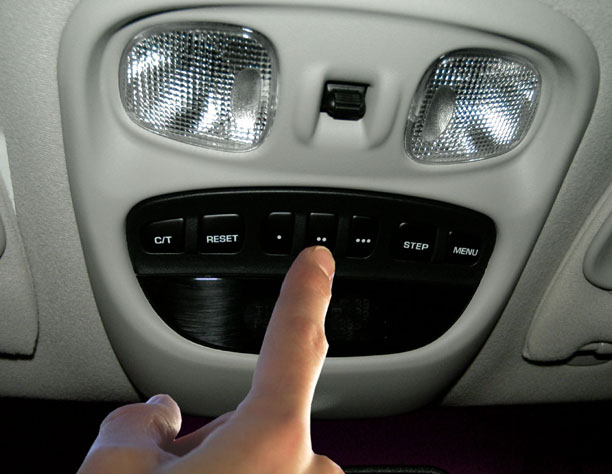
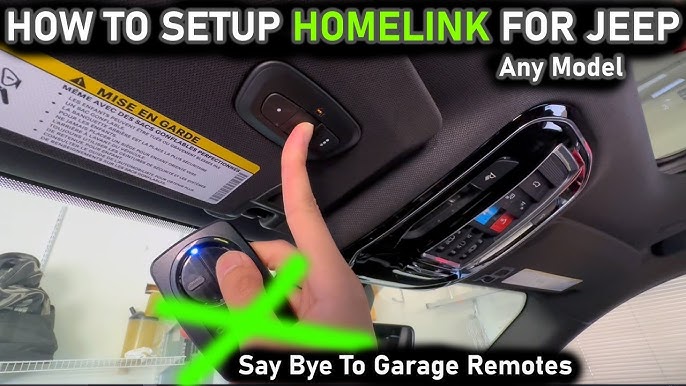
Most modern Jeep Grand Cherokees use the HomeLink system for garage door opener programming. HomeLink is built into the car—usually on the overhead console, near the sunroof controls, or the driver’s visor. Instead of carrying a separate remote, you press one of three HomeLink buttons to open your garage door.
Key points about HomeLink in Jeep Grand Cherokee:
- Works with most garage door brands in the US
- Can store up to three different devices (garage doors, gates, home lighting)
- Programming is usually quick, taking less than 10 minutes
HomeLink compatibility:
HomeLink supports most garage door openers made after 1993. If your opener is older, it might not work. Check the HomeLink website or your Jeep owner’s manual for a list of compatible brands.
What You Need Before You Start
Before programming your garage door opener in your Jeep Grand Cherokee, make sure you have:
- Your garage door remote (the one you usually use)
- The Jeep parked safely outside the garage (not inside)
- Access to your garage door opener’s “Learn” or “Smart” button (usually found on the motor unit inside the garage)
- A helper, if possible (not required, but can make things easier)
Important tips:
- If your garage uses a rolling code system (most modern doors do), you will need access to the “Learn” button.
- Write down the steps or keep this guide handy for reference.
Step-by-step Programming Guide
Follow these simple steps to program your Jeep Grand Cherokee garage door opener. The process is beginner-friendly and works for most models from 2011 onwards.
1. Clear Existing Homelink Codes
If your Jeep is new, skip this step. If you bought it used, clear old codes first:
- Hold down the two outer HomeLink buttons (1 and 3) for about 10 seconds.
- The indicator light will start blinking quickly.
- Release the buttons. HomeLink is now ready to be programmed.
Note: Clearing codes won’t affect your garage door opener, only the Jeep’s HomeLink memory.
Your Jeep has three HomeLink buttons. Pick one to assign to your garage door:
- Button 1 (left): For primary garage door
- Button 2 (middle): For second door or gate
- Button 3 (right): For third device
Mark the button’s use for easy recall later.
3. Program The Remote Signal
- Hold your garage door remote close (1–3 inches) to the HomeLink buttons.
- Press and hold both the remote’s button and the chosen HomeLink button at the same time.
- Keep holding until the HomeLink indicator light changes from slow blinking to fast blinking (usually takes 20–30 seconds).
- Release both buttons.
Tip: If the light does not change, try again. Sometimes batteries in the remote are weak; replace if needed.
4. Train With Rolling Code System (if Needed)
Most garage doors from 1996 onward use a rolling code for extra security.
- Locate the “Learn” or “Smart” button on your garage door opener (usually on the back or side of the motor unit).
- Press the “Learn” button. You’ll have 30 seconds to return to your Jeep.
- Inside the Jeep, press and hold the programmed HomeLink button for 2–3 seconds, then release.
- Repeat this step up to three times to complete the process.
Example:
If your opener is LiftMaster or Chamberlain, the “Learn” button is usually yellow or purple.
5. Test The Setup
- Wait a few seconds.
- Press the HomeLink button you programmed.
- If the garage door opens or closes, your setup is successful.
If not, repeat step 4, making sure you press the button within the 30-second window.
Troubleshooting Common Problems
Programming doesn’t always work on the first try. Here’s how to solve frequent issues:
- HomeLink light does not blink: Check your remote’s battery. Try holding both buttons for longer.
- Garage door does not respond: Make sure you pressed the “Learn” button and returned to the Jeep quickly.
- Wrong button pressed: Clear codes and start over.
- Jeep’s HomeLink not compatible: Very rare, but check your garage opener’s age. If it’s before 1993, consider an upgrade.
Non-obvious insight:
Some garage doors require you to press the HomeLink button several times after programming, as the system learns the signal. Don’t give up if it doesn’t work instantly.

Credit: www.jeepgarage.org
Practical Data: Compatibility And Examples
Many users want to know if their garage door opener will work with Jeep HomeLink. Here’s a comparison of popular brands and compatibility:
| Brand | Year Range Supported | Rolling Code | HomeLink Compatible? |
|---|---|---|---|
| LiftMaster | 1993–present | Yes | Yes |
| Chamberlain | 1993–present | Yes | Yes |
| Genie | 1995–present | Yes | Yes |
| Craftsman | 1993–present | Yes | Yes |
| Older brands | Before 1993 | No | No |
Example:
If you have a Genie opener from 2000, you can use your Jeep’s HomeLink without issues.
How Homelink Differs From Standard Remotes
HomeLink is more than just a remote. Here’s how it compares:
| Feature | HomeLink | Standard Remote |
|---|---|---|
| Built-in device | Yes (car) | No (separate) |
| Supports multiple doors | Up to 3 | Usually 1 |
| Rolling code support | Yes | Varies |
| Battery needed | No | Yes |
| Can be lost | No | Yes |
Non-obvious insight:
HomeLink does not need batteries or replacement, unlike handheld remotes. Once programmed, it stays with your car.
Tips For Reliable Programming
Programming the garage door opener in your Jeep Grand Cherokee is simple, but these tips help avoid mistakes:
- Check remote battery: Weak batteries cause signal problems.
- Program outside garage: Prevents accidental door movement inside closed spaces.
- Label HomeLink buttons: Use small stickers or notes if you program more than one device.
- Repeat rolling code step: Sometimes, the opener needs two or three tries to learn the signal.
- Consult manual: If steps fail, your Jeep’s owner manual provides model-specific instructions.
Safety tip:
Never program the garage door opener while the car is running inside a closed garage. Carbon monoxide can be dangerous.
Resetting Or Changing The Homelink Program
If you move to a new house or change garage doors, you’ll want to reset HomeLink:
- Clear old codes: Press and hold the outer buttons for 10 seconds.
- Reprogram with new remote and rolling code steps.
- Test each button after programming.
Practical scenario:
You bought a used Jeep Grand Cherokee and want to use your own garage. Clearing old codes ensures only your opener works.
Credit: jeepspecs.com
Comparison: Jeep Grand Cherokee Vs Other Brands
Some drivers ask if programming is easier in a Jeep than in other vehicles. Here’s a quick comparison:
| Vehicle Brand | HomeLink Location | Programming Steps | Rolling Code Support |
|---|---|---|---|
| Jeep Grand Cherokee | Overhead console | Simple, 3–4 steps | Yes |
| Toyota Highlander | Sun visor | Similar steps | Yes |
| Ford Explorer | Overhead console | Similar steps | Yes |
| Honda CR-V | Rearview mirror | Similar steps | Yes |
Insight:
Programming steps are nearly identical across brands, but Jeep’s overhead console location is easy to access.
Extra Features And Smart Home Integration
The Jeep Grand Cherokee’s HomeLink system can control more than just garage doors:
- Gates for private communities
- Home lighting systems
- Security gates
Some smart home systems let you connect HomeLink to open doors from your phone. Check your device’s compatibility online, or visit HomeLink official site for more info.
Credit: www.youtube.com
Frequently Asked Questions
How Many Devices Can I Program To My Jeep Grand Cherokee’s Homelink?
You can program up to three devices—such as garage doors, gates, or home lighting. Each button on the HomeLink panel is for a different device.
What Should I Do If My Garage Door Opener Is Not Responding?
Check the remote battery and repeat the programming steps. If your opener uses a rolling code, make sure you pressed the “Learn” button and returned to your Jeep quickly. If it’s an older opener (before 1993), compatibility might be an issue.
Can I Program Homelink Without The Garage Door Remote?
You need the remote for programming. The system learns the signal from your remote. If you lost it, you can buy a replacement remote from your opener’s manufacturer.
Is It Safe To Program The Opener Inside The Garage?
It’s best to program outside the garage. Programming inside can cause the door to move unexpectedly, which is dangerous. Always keep the car outside and the garage door open during setup.
What If I Move Or Buy A New House?
Clear the old codes by holding the two outer HomeLink buttons for 10 seconds. Reprogram the system with your new garage remote and rolling code steps.
Programming your Jeep Grand Cherokee garage door opener is a simple way to make your daily routine smoother. With HomeLink, you get reliable, built-in control for up to three devices. Follow the clear steps, use the tips, and check compatibility for your garage door brand. Even if you’re a beginner, you’ll find this process safe, quick, and convenient. If you need more details or troubleshooting, your Jeep owner’s manual and HomeLink official site offer extra guidance. Enjoy the comfort and security of opening your garage door with a single touch in your Jeep.