
Jeep Grand Cherokee Garage Door Opener Programming Made Easy
 Reading Time: 8 minutes
 When you buy a Jeep Grand Cherokee, one feature many drivers notice is the built-in garage door opener. This handy tool lets you open your garage without needing a separate remote. It’s part of the vehicle’s HomeLink system—a universal transmitter found in many modern cars. Learning how to program this system is important, especially for beginners. If you’re new to it, don’t worry. Programming your Jeep Grand Cherokee garage door opener is easier than you might think, and you don’t need special tools or technical skills.
Understanding The Jeep Grand Cherokee Garage Door Opener
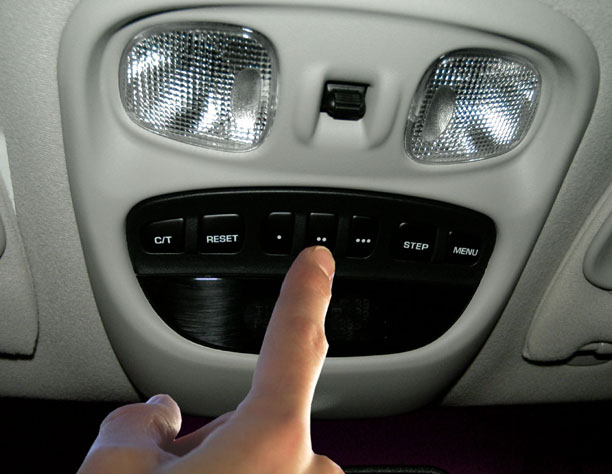
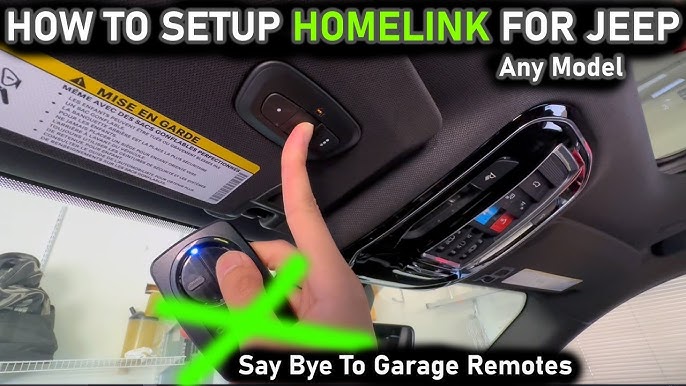
The HomeLink system is located in the overhead console, usually near the sunroof controls. It replaces separate garage door remotes with three programmable buttons. These buttons can also control gates, home lighting, and security systems.
Here’s what the HomeLink system offers:
- Convenience: No need for extra remotes
- Security: Integrated with your vehicle, so less risk of losing remotes
- Versatility: Works with most garage doors and gates
Before you start programming, check your garage door opener’s compatibility. Most brands work, but some older models may not. You can find compatibility details in your Jeep owner’s manual or on the HomeLink website.
Step-by-step Programming Guide
Programming your Jeep Grand Cherokee garage door opener usually takes less than 15 minutes. Follow these steps for a smooth experience:
1. Prepare Before Programming
- Park your Jeep outside the garage to avoid accidents.
- Have your original garage door remote ready.
- Make sure the remote has fresh batteries.
2. Clear Previous Settings
If you’ve never programmed the system before, skip this step. If you’ve used the HomeLink buttons for another device, clear them first.
- Press and hold the two outer HomeLink buttons (1 and 3).
- Hold for 10–20 seconds until the indicator light starts flashing.
- Release the buttons. The system is now ready.
3. Enter Programming Mode
- Choose the HomeLink button you want to use.
- Hold the garage door remote near the overhead console (about 1–2 inches away).
- Press and hold both the remote button and the chosen HomeLink button at the same time.
The indicator light will change:
- Flashing slowly: Learning mode
- Flashing rapidly: Signal received
Release both buttons once the light flashes rapidly.
4. Sync With Garage Door Opener
Many garage doors use a rolling code for security. If your opener has a “Learn” or “Smart” button, you need to sync the Jeep and the opener.
- Find the “Learn” button on your garage motor unit (usually above the garage door).
- Press the “Learn” button (you may need a ladder).
- Within 30 seconds, press the programmed HomeLink button in your Jeep for 2 seconds.
- Repeat pressing up to three times for full sync.
5. Test The System
- Wait a few seconds after programming.
- Press the HomeLink button.
- The garage door should open or close.
If it doesn’t work, repeat steps 3–4. Make sure you’re pressing the correct buttons and following the timing.

Credit: www.jeepgarage.org
Example: Programming A Liftmaster Opener
Let’s look at a practical example with a LiftMaster garage door opener, one of the most popular brands.
- Park the Jeep outside.
- Hold the LiftMaster remote near the HomeLink panel.
- Press and hold both the remote button and the HomeLink button you want to program.
- Release when the indicator flashes rapidly.
- Go to the garage motor, press the “Learn” button.
- Within 30 seconds, press the HomeLink button in your Jeep.
- The garage door should respond.
This process works for most brands, but check your opener model for specific instructions.
Data: Common Garage Door Opener Brands And Compatibility
Here’s a comparison of compatibility for popular garage door opener brands:
| Brand | Rolling Code Support | HomeLink Compatibility | Typical Programming Steps |
|---|---|---|---|
| LiftMaster | Yes | Yes | Standard + Learn button |
| Chamberlain | Yes | Yes | Standard + Learn button |
| Genie | Yes | Yes | Standard + Learn button |
| Craftsman | Yes | Yes | Standard + Learn button |
| Older models (pre-1996) | No | Varies | May need adapter |
Most current garage door openers use rolling codes. If your opener is older, you may need an adapter or extra steps.
Credit: jeepspecs.com
Troubleshooting Common Problems
Sometimes, programming doesn’t work on the first try. Here are practical tips:
- Weak signal: Try new batteries in your remote.
- Wrong button: Double-check which HomeLink button you pressed.
- Rolling code not synced: Repeat the “Learn” button steps. Timing is important.
- Distance issues: Move your Jeep closer to the garage door opener for better signal.
If you see blinking lights but the door doesn’t move, try reprogramming. Also, check if your garage door opener is compatible. If you still have problems, contact your Jeep dealer or HomeLink support.
Data: Jeep Grand Cherokee Homelink Features
Let’s compare the HomeLink features in recent Jeep Grand Cherokee models:
| Model Year | HomeLink Buttons | Location | Extra Features |
|---|---|---|---|
| 2020 | 3 | Overhead console | Works with gates, lights |
| 2021 | 3 | Overhead console | Security systems |
| 2022 | 3 | Overhead console | Updated UI, easier programming |
| 2023 | 3 | Overhead console | Wireless integration |
Each year, Jeep adds small improvements. The basic process remains the same for programming.
Practical Tips For Beginners
Programming may look technical, but it’s simple if you follow these tips:
- Read the manual: Your Jeep owner’s manual has clear instructions.
- Use good batteries: Weak batteries cause problems.
- Do it in daylight: Easier to see buttons and garage opener.
- Have a helper: Someone can press the “Learn” button while you stay in the Jeep.
- Keep your remote close: Hold it within 2 inches of the HomeLink panel.
Non-obvious insight: Many beginners don’t realize the HomeLink system can control more than just garage doors. You can program it for gates and home lighting if you have compatible systems.
Safety Precautions
Safety is important during programming. Here are steps to stay safe:
- Park away from the garage door to avoid accidents.
- Make sure the garage door area is clear.
- Use a sturdy ladder for the “Learn” button.
- Don’t let children play with HomeLink buttons.
Another non-obvious insight: Some garage door openers have a lock feature. If your door doesn’t respond, check if the lock is engaged.
Credit: www.youtube.com
Advanced Features And Customization
HomeLink in the Jeep Grand Cherokee isn’t just for garage doors. You can use it for:
- Gate openers: Works with most residential gates.
- Home lighting: Program to turn lights on and off.
- Security systems: Control alarms or locks.
To program these, follow similar steps. Use the original remote to teach the HomeLink button. Check compatibility for your device.
Data: Garage Door Opener Frequency Comparison
Some garage door openers use different frequencies. Here’s a comparison:
| Brand | Frequency (MHz) | Rolling Code |
|---|---|---|
| LiftMaster | 315 / 390 | Yes |
| Chamberlain | 315 / 390 | Yes |
| Genie | 315 / 390 | Yes |
| Older brands | 300 | No |
If your opener uses 300 MHz and doesn’t have rolling codes, you may need an adapter for HomeLink.
What To Do If Programming Fails
If you follow all steps but the garage door opener doesn’t work:
- Try reprogramming from the beginning.
- Change the batteries in your remote.
- Move the Jeep closer to the opener.
- Check for compatibility issues.
- Reset HomeLink and try again.
If you still can’t program the system, visit your Jeep dealer. They can help with technical problems. You can also check the official HomeLink website for troubleshooting guides.
Maintaining Your System
Once programmed, the HomeLink system rarely needs maintenance. But keep these points in mind:
- If you change your garage door opener, reprogram the HomeLink button.
- If you sell your Jeep, clear all HomeLink settings for privacy.
- Test the system monthly to make sure it works.
Frequently Asked Questions
How Many Devices Can I Program With Jeep Grand Cherokee Homelink?
You can program up to three devices—one for each HomeLink button. Most drivers use these for garage doors, gates, or home lighting.
Do I Need Special Tools To Program The Garage Door Opener?
No. You only need your original garage door remote and access to the “Learn” button on your garage motor. Fresh batteries help, but no special tools are needed.
What Should I Do If My Garage Door Opener Is Too Old?
If your opener is older than 1996 or doesn’t use rolling codes, you might need a HomeLink adapter. These are available online and help connect older systems.
Can I Erase Homelink Settings Before Selling My Jeep?
Yes. Hold the two outer HomeLink buttons for about 20 seconds until the indicator light flashes. This clears all settings and protects your privacy.
Does Homelink Work With Smart Home Systems?
Some smart home devices work with HomeLink, but compatibility varies. Check your device’s manual or the HomeLink website for details.
Programming your Jeep Grand Cherokee’s garage door opener is a quick and rewarding task. With the steps above, even beginners can set up their system in minutes. Remember to check compatibility, use fresh batteries, and follow safety tips. The HomeLink system adds convenience and security to your daily routine, making your Jeep Grand Cherokee even more valuable.
If you run into trouble, your Jeep dealer or the HomeLink website can help. Enjoy the freedom of opening your garage with a single touch!