
How to Turn off Headlights on Jeep Grand Cherokee Easily
 Reading Time: 9 minutes
 Turning off your Jeep Grand Cherokee headlights can seem simple—until you try it for the first time. Many drivers find themselves confused by automatic headlight features, the different controls, and what actually turns the lights off versus just dimming them. If you’re new to the Grand Cherokee or switching from another car, this guide will help you fully understand the process. You’ll learn clear steps, practical examples, and common mistakes so you can confidently control your headlights.
Understanding Your Jeep Grand Cherokee’s Headlight System
The Jeep Grand Cherokee comes with several types of headlight systems, depending on the model year and trim:
- Manual headlights (older models)
- Automatic headlights (most models since 2011)
- Daytime running lights (DRLs)
- Adaptive/LED headlamps (recent models)
Knowing what your vehicle uses is key. Most modern Grand Cherokees have a combination of automatic and manual options. The system is designed to improve safety but can be less obvious to control.
Why Headlights Stay On
You might notice your headlights stay on after you park, or even when you think you turned them off. Reasons include:
- Automatic headlight mode: Keeps lights on as long as it’s dark.
- DRLs: Lights that stay on whenever you drive.
- “Follow Me Home” function: Lights stay on for a set time after you exit.
Each feature is meant to help, but can confuse new owners who just want complete control.
How To Turn Off Headlights: Step-by-step For Common Jeep Grand Cherokee Models
Let’s look at the typical process for most Grand Cherokees from 2011 onward, which covers the majority of used and new vehicles.
For Models With A Headlight Control Knob (2011–present)
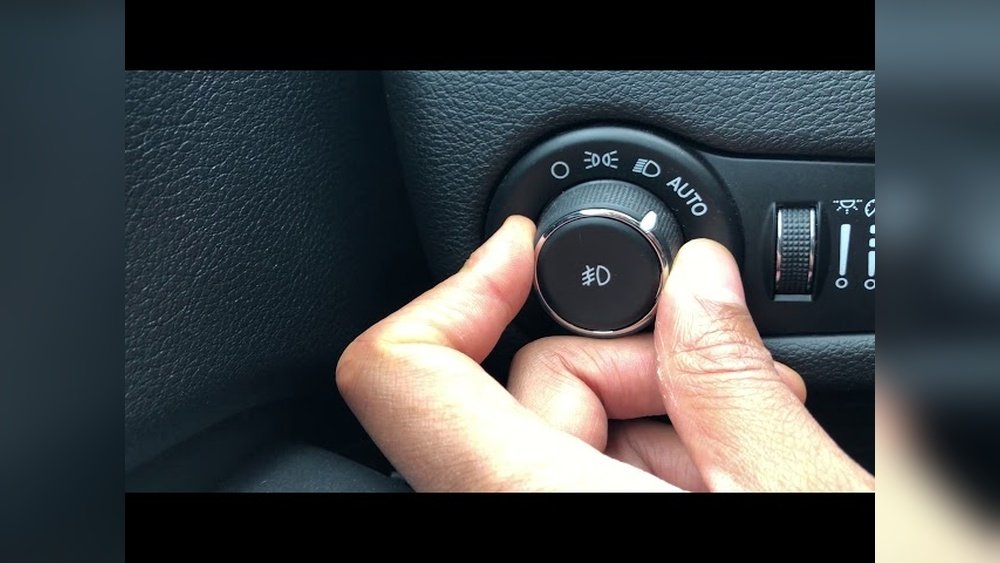
Find the headlight control knob on the left side of your steering wheel, near the dashboard.
- Locate the knob: It’s marked with symbols for “Auto,” “Off,” “Parking,” and “Headlights.”
- Turn to “Off”: Rotate the knob to the “O” (Off) position. Your headlights should switch off.
- Check for DRLs: Daytime running lights may stay on. To turn these off, set the parking brake before starting the vehicle.
Important Note: On some trims, there is no true “Off” option—only Auto. In these cases, the car controls the lights automatically.
For Models With Automatic Headlights
If your Grand Cherokee only offers “Auto,” the headlights will turn on or off based on ambient light. You can:
- Override temporarily: Turn the knob to “Parking” or “Headlights” to force them on.
- No full manual off: The system may not allow you to fully switch off headlights while the engine is running.
For Older (pre-2011) Grand Cherokees
Older models usually have a simple twist knob or pull switch:
- Twist or pull switch to “Off”
- All lights should go out
This design is more direct, but even here, DRLs may stay on for safety.
Special Cases: Adaptive And Led Headlights
Newer Grand Cherokees with adaptive LED headlamps have more sensors. The main control is still the knob, but:
- Automatic operation: Headlights adjust beam and angle automatically.
- Manual off: Set the knob to “Off.” Some features, like cornering lights, only work in Auto or On.
Tip: If you’re unsure, check your owner’s manual for your exact model year.
Typical Headlight Control Positions
To help you, here’s a simple comparison of the main positions you’ll see on the control knob:
| Position | Symbol | Function |
|---|---|---|
| Off | O | All exterior lights off |
| Auto | A | Senses light and turns on/off automatically |
| Parking | (Small light) | Activates only parking lights |
| Headlights | (Headlight symbol) | Turns on main headlights |
How Daytime Running Lights Affect Headlight Control
Daytime running lights (DRLs) are often misunderstood. They are a safety feature, designed to make your vehicle more visible during the day.
- DRLs usually cannot be turned off unless the parking brake is engaged.
- They use less power than main headlights.
- Not the same as headlights: DRLs are dimmer and less useful at night.
Example: If you start your Jeep Grand Cherokee, release the parking brake, and put the gear in Drive, DRLs will activate—even if the control knob is set to “Off.”

Credit: www.shermandodge.com
Turning Off Headlights When Leaving The Car
Many drivers notice their headlights stay on for a few seconds after turning off the engine and locking the car. This is called the “Follow Me Home” feature.
- Default time is 30–90 seconds depending on model.
- Purpose: Lights up your path when walking away at night.
- To disable: In most models, you can change this in the vehicle settings menu. Some models require a dealer adjustment.
Tip: If you want the headlights to go off immediately, wait until the lights turn off before exiting, or set the feature to zero in the menu (if available).
Headlights Vs. Parking Lights Vs. Fog Lights
Jeep Grand Cherokee controls can be confusing because of the number of lights. Here’s a quick comparison:
| Type | When to Use | How to Turn Off |
|---|---|---|
| Headlights | Night, rain, fog | Turn knob to “Off” |
| Parking Lights | Stopped, low light, parking | Turn knob to “Off” or “Auto” |
| Fog Lights | Heavy fog, snow, dust | Press fog light button (usually in the middle of the knob) |
Insight: Many drivers accidentally leave parking or fog lights on, thinking they’ve turned off all lights. Always check your dashboard indicators.

Credit: www.morriesinvergrovemazda.com
Common Mistakes When Turning Off Headlights
People new to the Jeep Grand Cherokee often make these mistakes:
- Leaving the knob on Auto: Thinking this will turn off all lights. In reality, DRLs or headlights may stay on.
- Not checking for DRLs: DRLs can make it seem like headlights are still on.
- Not using the parking brake: This is sometimes needed to fully turn off DRLs.
- Exiting before headlights shut off: Headlights may stay on for the “Follow Me Home” period.
- Forgetting about fog/parking lights: These may remain on if not switched off separately.
Tips For Headlight Control Success
- Check your dashboard: A headlight symbol means your main lights are on.
- Use the parking brake: To shut off DRLs, especially when idling.
- Change settings in Uconnect: For Grand Cherokees with touchscreens, adjust headlight delay or auto functions in the Uconnect menu.
- Consult your manual: Each year/model can have small differences.
Pro Tip: If you want complete manual control, look for pre-2011 models, or check trim levels before buying.

Credit: www.youtube.com
Headlight Settings By Model Year
To make things easier, here’s a summary by recent model years:
| Model Year | Manual Off Option | Automatic Only | DRL Control |
|---|---|---|---|
| 2022–2024 | Partial (some trims) | Yes (most trims) | Parking brake only |
| 2017–2021 | Yes | Available | Parking brake only |
| 2011–2016 | Yes | No | Parking brake only |
| 2005–2010 | Yes | No | Parking brake only |
Insight for beginners: On most Grand Cherokees, the only way to fully turn off all exterior lights is to use the parking brake, especially with DRLs.
What To Do If Headlights Won’t Turn Off
Sometimes, even when you’ve done everything right, the headlights stay on. Here’s what to check:
- Is the knob really on Off? Double-check the position.
- Is the parking brake engaged? Try setting it and see if lights go off.
- Has the “Follow Me Home” time expired? Wait up to 90 seconds.
- Is the ignition fully off? Some trims require the key to be fully out.
- Is there a system error? If nothing works, there may be a sensor or switch fault.
If you suspect a fault, a certified Jeep dealer can diagnose electrical issues.
When To Seek Help
While most headlight issues are user error, you should get help if:
- Headlights won’t turn off even with ignition and parking brake off.
- You see warning lights or messages on your dashboard.
- You notice flickering or inconsistent operation.
A professional can check for wiring problems, relay faults, or sensor issues that are not user-serviceable.
Advanced Headlight Settings In Uconnect
For models with the Uconnect infotainment system, you can adjust headlight settings:
- Auto-dimming time: How long headlights stay on after locking.
- Sensitivity: When headlights turn on in low light.
- DRL enable/disable: Available in some markets.
How to access:
- Turn on the ignition.
- Use the touchscreen to go to “Settings.”
- Select “Lights” or “Exterior Lighting.”
- Adjust as needed.
Not all features are available on every trim. Check your manual for what’s possible on your specific Jeep.
Real-world Example: Turning Off Headlights On A 2021 Grand Cherokee
Let’s say you drive a 2021 Jeep Grand Cherokee Limited. Here’s how you’d turn off the headlights:
- Come to a stop and park.
- Turn the headlight control knob to “Off.”
- Engage the parking brake. (DRLs switch off.)
- Turn the ignition off and exit the car.
- Wait for the headlights to turn off (if “Follow Me Home” is active).
If you skip the parking brake, DRLs will stay on until the ignition is off.
Non-obvious Insights Beginners Miss
- Parking brake trick: Most drivers don’t realize DRLs can only be disabled using the parking brake. This is often not listed clearly in the quick start guide.
- Auto mode is not full off: “Auto” means the car decides when to turn lights on, which may keep them on in low light—even during the day.
- “Off” isn’t always off: On some trims, the “Off” position still allows DRLs or some exterior lights to function if the car is in gear.
Safety Reminders
- Always use headlights at night or in bad weather. Turning them off when needed can be dangerous.
- Check local laws: In some states, DRLs are required whenever the car is moving.
- If unsure, leave in Auto: Automatic mode provides the best safety for most drivers.
Frequently Asked Questions
How Do I Turn Off The Headlights Completely On My Jeep Grand Cherokee?
To fully turn off all lights, set the headlight knob to “Off” and engage the parking brake before starting the engine. This disables DRLs. Some newer trims may not allow all exterior lights to be switched off while driving.
Why Do My Headlights Stay On After I Lock My Jeep Grand Cherokee?
This is likely the “Follow Me Home” feature. Headlights remain on for 30–90 seconds to light your path as you leave. The setting can be adjusted in your Uconnect menu or may require dealer help.
Can I Turn Off Daytime Running Lights (drls) While Driving?
No. In most Grand Cherokees, DRLs can only be turned off by engaging the parking brake before shifting out of Park. This is a safety feature and cannot be disabled while the car is in motion.
My Headlight Control Knob Doesn’t Have An “off” Position. What Should I Do?
If your model only offers “Auto,” the system will manage headlights for you. You cannot manually turn off all exterior lights. This is common in newer Grand Cherokees due to safety regulations.
Are There Any Legal Issues With Turning Off Headlights While Driving?
Yes. Most states require headlights on at night, in poor visibility, or when using windshield wipers. DRLs are required in some areas. Turning off headlights when needed can result in a ticket. Check your state’s laws or refer to the National Highway Traffic Safety Administration for official guidance.
Getting used to your Jeep Grand Cherokee’s headlight system takes a little practice, but with these tips, you’ll avoid common mistakes and know exactly how to control your lights. Always prioritize safety and use the settings that give you the best visibility for your drive.